Corporate meeting rooms and classrooms both run on the same underlying interactive display technology, which leads a lot of buyers to assume one configuration fits both. It doesn’t. The panel hardware might be similar, but what surrounds it — the software, the peripherals, the room design — should be built around a genuinely different use case. This guide breaks down what each setting actually needs.
The Corporate Meeting Room: Built Around Speed and Flexibility
A meeting room’s core job is to get a meeting started with minimal friction, whoever walks in and whatever device they’re carrying. That shapes the priority list:
- BYOM (Bring Your Own Meeting) support, so people can join through whatever conferencing platform their organisation or client already uses, rather than being locked into one system.
- Fast wireless screen sharing, so a presenter connects in seconds without hunting for a cable.
- A capable microphone array and camera, since remote participants are often part of every meeting, not an occasional exception.
- Moderator or access control, so a client-facing presentation doesn’t get interrupted by an accidental wireless connection from someone else’s device.
- Room booking integration, so the display or a panel outside the door shows real-time availability rather than people wandering room to room looking for a free space.
Meeting rooms generally don’t need lecture capture or dedicated teaching software — the content is usually ephemeral, built for that meeting and not needed again after.
The Classroom: Built Around Teaching and Retention
A classroom’s job is different in a way that changes almost every priority. Content needs to be created, taught, recorded, and often revisited — by students who missed the session, by the teacher planning the next one, by an institution auditing course delivery. That shapes a different priority list:
- Interactive teaching software with lesson tools, subject-specific templates, and classroom management features — not just a blank annotation canvas.
- Lecture capture, recording and streaming sessions automatically so they can be reviewed later or delivered to students who couldn’t attend live.
- A digital podium or lectern-integrated display, letting a teacher control content, notes, and the room’s AV system from one control point at the front.
- Interactive response systems (clickers or app-based polling) for real-time comprehension checks during a lesson.
- For larger institutions, centralised AV-over-IP management so IT can push content, updates, and scheduling across many classrooms from one control platform rather than managing each room individually.
Where the Two Overlap
Both settings benefit from touch interaction, wireless sharing, and solid audio-video quality — the baseline hardware requirements are genuinely similar. Training rooms sit in the middle: a corporate training room often wants classroom-style features (structured content delivery, sometimes recording for compliance purposes) built on meeting-room-style flexibility (different presenters, different content each session, occasional external attendees joining by video).
Higher Education: A Third Category
University settings often need a hybrid of both models at a larger scale — lecture halls need classroom-grade teaching and capture tools, but the sheer number of rooms across a campus makes centralised, unified control across every space a practical necessity, not a luxury. This is typically where a platform-level AV-over-IP solution — distributing content, managing devices, and scheduling centrally — becomes the deciding factor over individual room hardware choices.
A Decision Framework
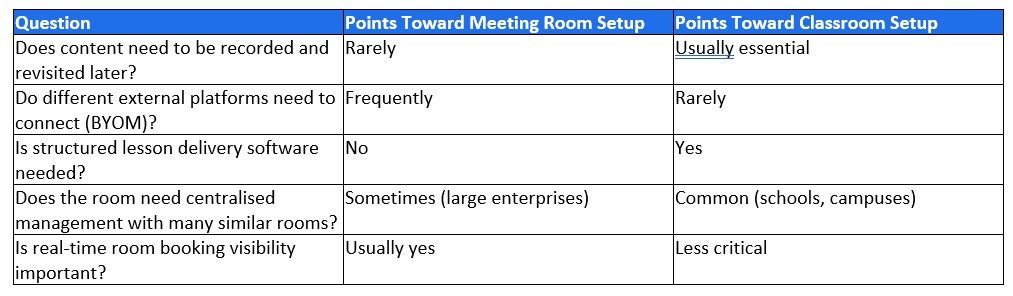
Getting the Configuration Right
The mistake to avoid is buying identical setups for every room because it simplifies procurement. A meeting room configured like a classroom carries software licences and features nobody uses; a classroom configured like a meeting room lacks the teaching tools that actually justify the investment. AI HCM configures interactive display solutions differently for corporate meeting rooms, training rooms, and education settings, matching software and peripherals to how the room is actually used rather than a one-size-fits-all package. Talk to us about the right configuration for your space.
Disclaimer: This article is for general information only and is not legal, tax or professional advice. Statutory rates, rules and product specifications in Malaysia can change. The information is accurate as of the date the article was published or last updated. Check the latest guidance from the relevant authority, or speak to a qualified adviser or our team, before making decisions.